
This is very crucial to understand as this saved you a lot from loss especially if you are targeting pricing bonuses, chargebacks, bonus the more!
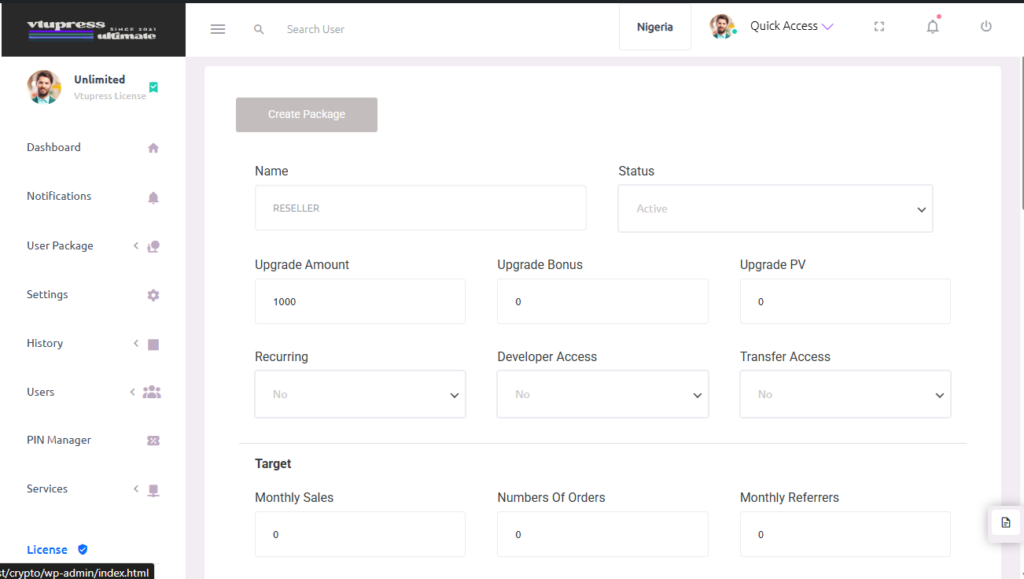
You can use the Create Package Button to create a package for your users. Your users can then upgrade to that package provided it is active.
Basics: #
Upgrade Amount : This is the amount @ which users will be charged for upgrading to this package
Upgrade Bonus : Fiat amount the user will get to their wallet balance upon upgrading to this package as commission
Upgrade Pv : Addition pv given to that user upon upgrade
Recurring : Is this package target / subscription based?
Developer Access : Would users in this package have access to api?
Transfer Access : Would users on this package have access to transferring funds out of wallet?
Target: #
Monthly Sales : Minimum total amount of successful transactions per month a user must make to maintain that package}
Number Of Orders : The total number of unit of successful transaction the user must make
Monthly Referrers : Number of referrer a user must refer in one month to maintain that package.
Note: All target here must be met to retain access to the package else it fallbacks of auto deduction of users balance (Upgrade Amount) at the end of the month to use that package
Referrer Bonus #
Bonus given to the direct upline whether the user on this package is upgrading first time or recurrently on target/re subscription
Upgrade Pv : Point Values given to the upline
Upgrade Bonus : How much is given to this user once the upline
Fund Bonus : How much to give to the upline if this user funds his wallet
Fund Amount Minimum : How much funding amount @ minimum is required before the fund bonus can be given to the upline
Fund Count : The number of times the Fund Bonus can be given to the upline. 0 means no bonus is given
Transaction Bonus (Deprecated – use generation below) : How much % is given per transaction to the upline
Generation (Referral) Setup #
This controls the uplines generation rewards. Click on the Add Generation to create a generation on create, you would see:
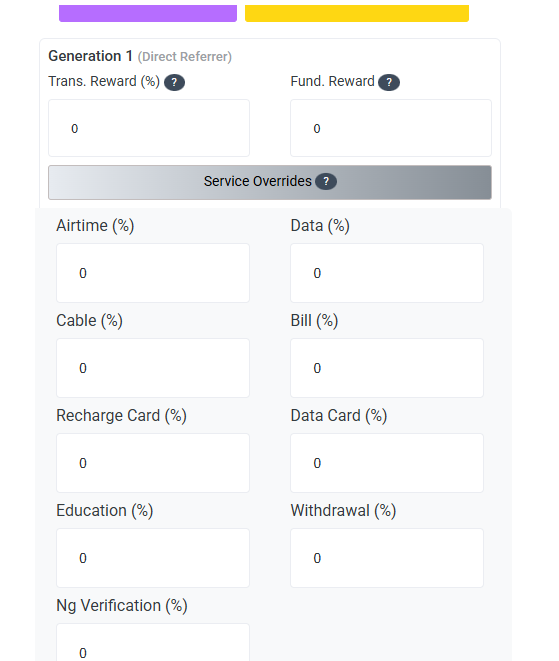
Trans Rewards %: Default bonus given to upline generation x (can be overriten by the service override
Fund Reward : Bonus given to upline generation x when the referee funds their wallet. e.g 2 for fiat and 2% for 2% of the funding amount
Services Overrides %: Click this to open the service bonus modal to perform bonuses for the user
Tiered Service Rewards (Additive) / Bonus / Commission System #
This are extra commission/chargeback given to the user for every transactions based on what you set for each service you are adding for.
Here is how the bonuses works.
1. Providers Bonus : Some service with service type like Airtime -> Vtu has providers and each providers have their bonus whether in % or fiat. Vtupress calculates this first.
2. Service Bonus : The main service Airtime for instead can hold a service bonus which overrides number 1. Don’t worry, this is mostly visible to set when the service does not have a service type like vtu so for those with service types, use the provider bonus
3. Additive : This is a + to the bonus in fiat or percentage, it does not override, it adds to the bonus discount/commission.
e.g Amount = 200
If Providers Bonus = 3%, Service Bonus = 2%, Additive = 1% -> The total percentage is 3% (Service Bonus + Additive) = 6
If Providers Bonus = 3%, Service Bonus = 0, Additive = 1% -> The total percentage is 4% (Providers Bonus + Additive) = 8
If Providers Bonus = 4, Service Bonus = 0, Additive = 2% -> The total bonus/discount/commission 8 (4 + 2% of the amount (=4)) = 8
Renewal Bonus (Coming Soon) #
This is the bonus given if the user meets the target or re subscribe:
Airtime : Renewal Bonus (mostly the first service type of airtime e.g vtu) to the users registered phone number. please enter an amount
Data (API Plan ID from API Doc (Data)) : (coming soon)


